
How to Link Aadhaar Card to PAN Card Online Easily
Have you recently been told to link your Aadhaar card to your PAN card and wondered, “How exactly do I do that?” Don’t worry — you’re not alone!
Linking your Aadhaar with your PAN card might sound like yet another government formality, but it’s actually a simple and important step. In this blog, we’re going to walk you through how to link Aadhaar card to PAN card online. We’ll also look at why it’s necessary, who needs to do it, and what happens if you don’t.
Why Do You Need to Link Aadhaar with PAN?
Let’s start with the basics. The Indian government made it mandatory to link Aadhaar with PAN to cut down on tax fraud and duplication of PAN cards.
Here are a few reasons why this linkage is essential:
- It helps prevent tax evasion by detecting multiple PAN cards held by a single individual.
- It streamlines your tax filing process — your personal details get auto-filled in the ITR portal when both are linked.
- It ensures your PAN remains active. An unlinked PAN could be rendered inoperative by the Income Tax Department.
Sounds important, right? Luckily, the process is quite straightforward.
Who Needs to Link Their Aadhaar and PAN?
Pretty much everyone with both PAN and Aadhaar cards needs to do this. If you’re a resident Indian who files taxes, this rule applies to you. However, non-resident Indians (NRIs) and people over 80 years old may be exempt in some cases.
Deadline Alert: Don’t Miss the Last Date
The Income Tax Department has set deadlines for linking Aadhaar with PAN. If you miss it, your PAN could become inactive, which can create problems during tax filing, banking transactions, or applying for loans.
So, if you haven’t linked it yet — now’s the time!
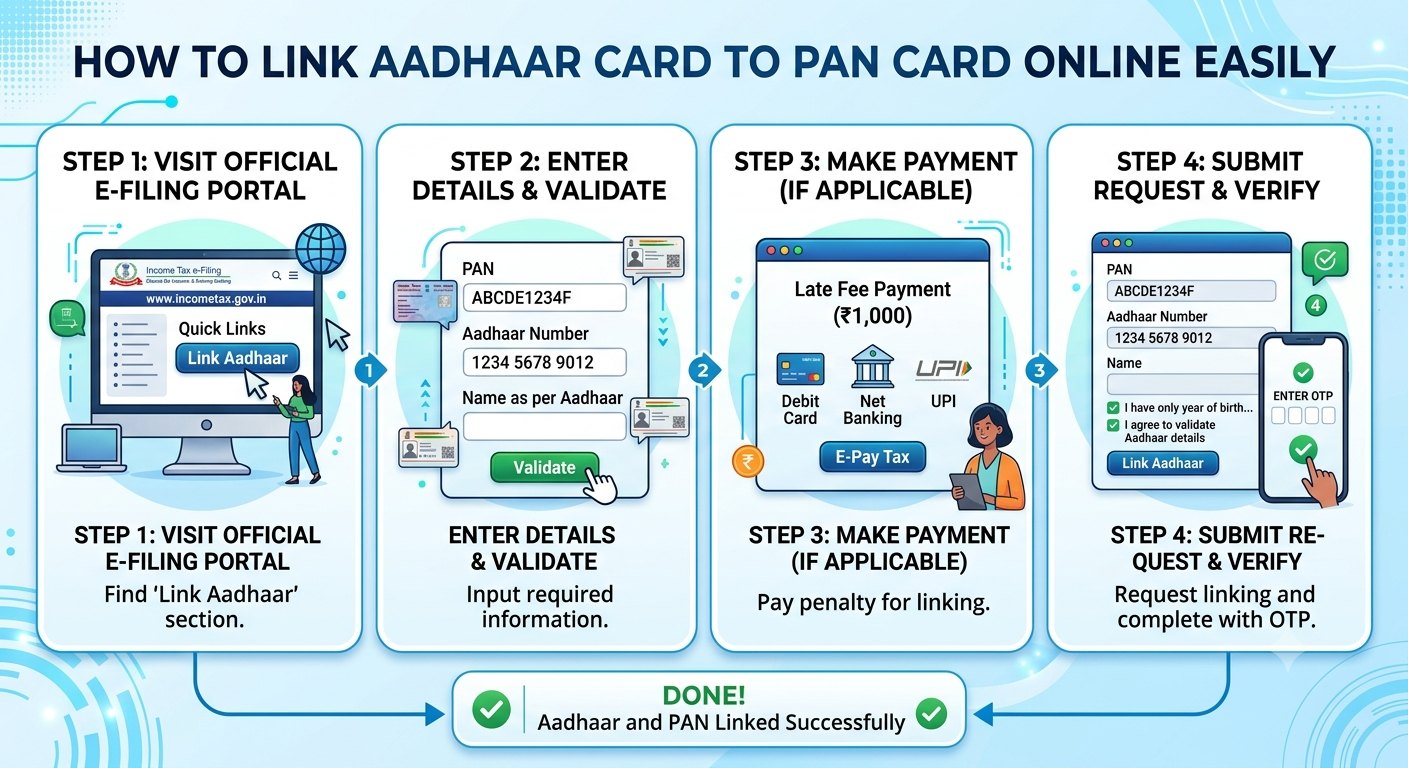
How to Link Aadhaar Card to PAN Card Online — Step-by-Step Guide
Okay, let’s get into the nitty-gritty. Here’s how you can link your Aadhaar card to your PAN card online through the Income Tax portal.
Step 1: Head Over to the Official Website
Visit the official Income Tax e-filing portal. You don’t need to log in for this process — it’s accessible to everyone.
Step 2: Find the ‘Link Aadhaar’ Option
On the homepage, scroll down and look for “Link Aadhaar” under the Quick Links section. Click on it.
Step 3: Enter Your Details
You’ll now be asked to enter your:
- PAN number
- Aadhaar number
- Name as printed on your Aadhaar card
Make sure everything is entered correctly — even a small mismatch can cause issues.
Step 4: Validate with OTP
Once the details are filled, you’ll receive an OTP (One Time Password) on your registered mobile number. Enter the OTP to proceed.
Step 5: Payment (If Applicable)
If you’re linking after the deadline, a small fee may apply. As of now, a fee of ₹1,000 is charged for delayed linkage. You will be redirected to a payment portal to complete the transaction.
Step 6: You’re Done!
Once the payment is confirmed (if required) and details match, you will see a confirmation message. The validation check may take a while, so keep an eye out for updates.
How to Check If Your Aadhaar Is Already Linked to PAN
Not sure whether you’ve already linked both? Here’s a simple way to check:
- Go to the Income Tax official portal
- Click on “Link Aadhaar Status”
- Enter your PAN and Aadhaar numbers
- Hit “View Link Status”
You’ll immediately see a message with the current status.
What Happens If You Don’t Link Them?
This is a common question: “What if I don’t link my Aadhaar to PAN?”
Here’s what can happen:
- Your PAN will become inoperative. That means you can’t use it for any financial transaction that requires it — like opening a bank account or filing your income tax returns.
- Filing ITR won’t be possible without a valid PAN.
- There might be penalties or delays in processing your income tax refunds.
In short: it’s best not to procrastinate!
Common Issues and How to Solve Them
Sometimes, people run into problems — names don’t match, dates of birth are off, or phone numbers are outdated. If that sounds familiar, don’t worry. Here’s what you can do:
- Name mismatch: Update your name in either PAN or Aadhaar database to match the other.
- Incorrect phone number? You’ll need your Aadhaar-linked mobile number for OTP. Update it on the UIDAI portal.
- Aadhaar not linked with mobile? Visit the nearest Aadhaar Enrollment Center to update it.
Helpful Tips to Keep in Mind
Still feeling unsure? Here are some final tips:
- Double-check the spelling of your name, especially if your Aadhaar card contains initials or abbreviations.
- Keep your phone nearby — you’ll need it for OTP verification.
- Use an updated browser for a smoother experience on the e-filing site.
Wrapping It Up
Linking your Aadhaar card with your PAN card isn’t just a government requirement—it’s also a convenient way to keep your financial records synchronized. And now that you know how to link Aadhaar to PAN online, you can easily get it done in a few minutes.
No more standing in long lines or filling forms by hand. Just a few clicks, and you’re sorted!
If you haven’t linked them yet, don’t wait for the deadline to sneak up on you. It only takes a few minutes — and it saves you from major headaches down the road.
Need More Help?
If you’re facing trouble or want assistance, your CA or financial advisor can help sort out the details. Or you can always visit your nearest PAN or Aadhaar Seva Kendra.
Have you linked your Aadhaar and PAN yet? If not, what’s holding you back? Let us know in the comments below!
And if you found this guide helpful, don’t forget to share it with your friends and family — everyone needs this info!
Keywords: how to link Aadhaar to PAN, link Aadhaar card to PAN online, PAN Aadhaar linking, Aadhaar PAN status check, PAN Aadhaar deadline